Operations
The "Operations" screen contains various buttons to monitor and interact with the network. Similar to actions pertaining to individual devices and switches, this screen and the actions become available once an On-Site Appliance is connected to the network, as (almost) all actions involve the real-world network.
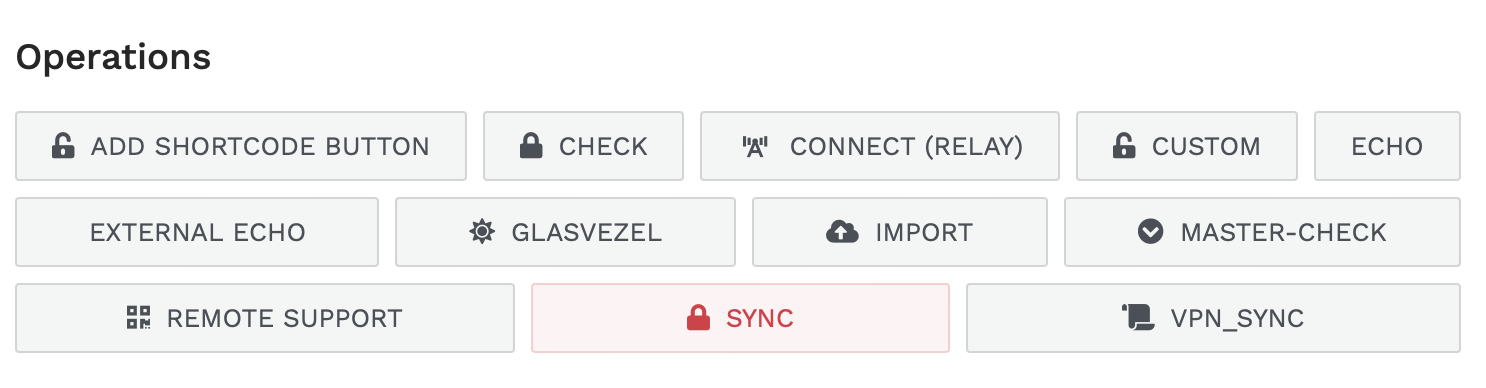
To access the "Operations" screen, click the "Operations" item in the main navigation menu on the left side of the screen.
By hovering over a button, a tooltip will appear, providing a brief description of the action (this feature is work-in-progress). Some buttons, indicated with a red border, may require confirmation before the action is executed as the action is deemed to be potentially dangerous or disruptive to the network.
Access control
This page lists (most) built-in action buttons that ship with ZEM by default, and the conditions under which they become visible. Actions that are purely automated (triggered by events or run on a schedule, never shown as buttons) are not listed here.
Two factors control whether an action appears for a given user:
- Minimum privilege level: The user's privilege level must be equal to or higher than the listed value. See Permissions for an overview of roles and their associated privilege levels.
- Condition: When listed, an additional condition must be met (e.g., a system setting must be configured). Actions without a condition have no additional requirements beyond the privilege level.
Some actions sit in a "group" with other actions. These actions are revealed by clicking the label of that group in the ZEM user interface.
Buttons are currently NOT tied to any roles or permissions, but this may change in the future. For now, the privilege levels listed here are the only access control mechanism for these buttons.
Operations screen
| Group | Action (EN) | Actie (NL) | Min. privilege level | Condition |
|---|---|---|---|---|
| Custom command | Custom commando | 100 | ||
| Fiber | Glasvezel | 50 | ||
| FlinQ | FlinQ | 100 | System setting flinq_url must be configured |
|
| Import | Import | 80 | ||
| Notifications | Meldingen | 100 | ||
| Port configurations | Poort configuraties | 99 | ||
| QList | QList | 0 | ||
| Remote support | Remote support | 100 | ||
| Remote support (QR) | Remote support (QR) | 1 | ||
| Synchronize ports | Synchroniseer poorten | 99 | ||
| Test OSA connection | Test OSA verbinding | 100 |
Device
| Group | Action (EN) | Actie (NL) | Min. privilege level | Condition |
|---|---|---|---|---|
| 802.1X | Check 802.1x | Check 802.1x | 100 | |
| Expert (QR) | Expert (QR) | 1 | ||
| Ping | Ping | 1 | ||
| Ping (Diagnostic) | Ping (Diagnose) | 50 | ||
| Program port(s) | Programmeer poort(en) | 50 | ||
| Restart port | Herstart poort | 10 | ||
| Status | Status | 10 | ||
| TOOLS | Clear ARP | ARP Wissen | 10 | |
| TOOLS | Custom command | Custom commando | 100 | |
| TOOLS | Expert | Expert | 90 | |
| TOOLS | GURU | GURU | 100 | |
| TOOLS | Multicast | Multicast | 100 | |
| TOOLS | Vlan override | Vlan override | 80 |
Group/Switch
| Group | Action (EN) | Actie (NL) | Min. privilege level | Condition |
|---|---|---|---|---|
| Backup | Backup | 100 | ||
| Interfaces | Interfaces | 100 | ||
| Ping | Ping | 1 | ||
| Port configurations | Poort configuraties | 99 | ||
| Status | Status | 100 | ||
| Status (QR) | Status (QR) | 1 | ||
| Synchronize ports | Synchroniseer poorten | 99 | ||
| TOOLS | check downlink | check downlink | 30 | |
| TOOLS | check uplink | check uplink | 30 | |
| TOOLS | Custom command | Custom commando | 100 | |
| TOOLS | Forget SSH Fingerprint | Vergeet SSH Fingerprint | 80 | |
| TOOLS | SNMP test | SNMP test | 30 |
Inspections
| Group | Action (EN) | Actie (NL) | Min. privilege level | Condition |
|---|---|---|---|---|
| Fix issues | Los problemen op | 100 |
Others
| Group | Action (EN) | Actie (NL) | Min. privilege level | Condition |
|---|---|---|---|---|
| Create VLAN | Maak VLAN aan | 100 | ||
| INFO | INFO | 80 | ||
| Show password | Toon wachtwoord | 100 | ||
| Switch discovery | Switch discovery | 100 | ||
| Terminal | Terminal | 100 |